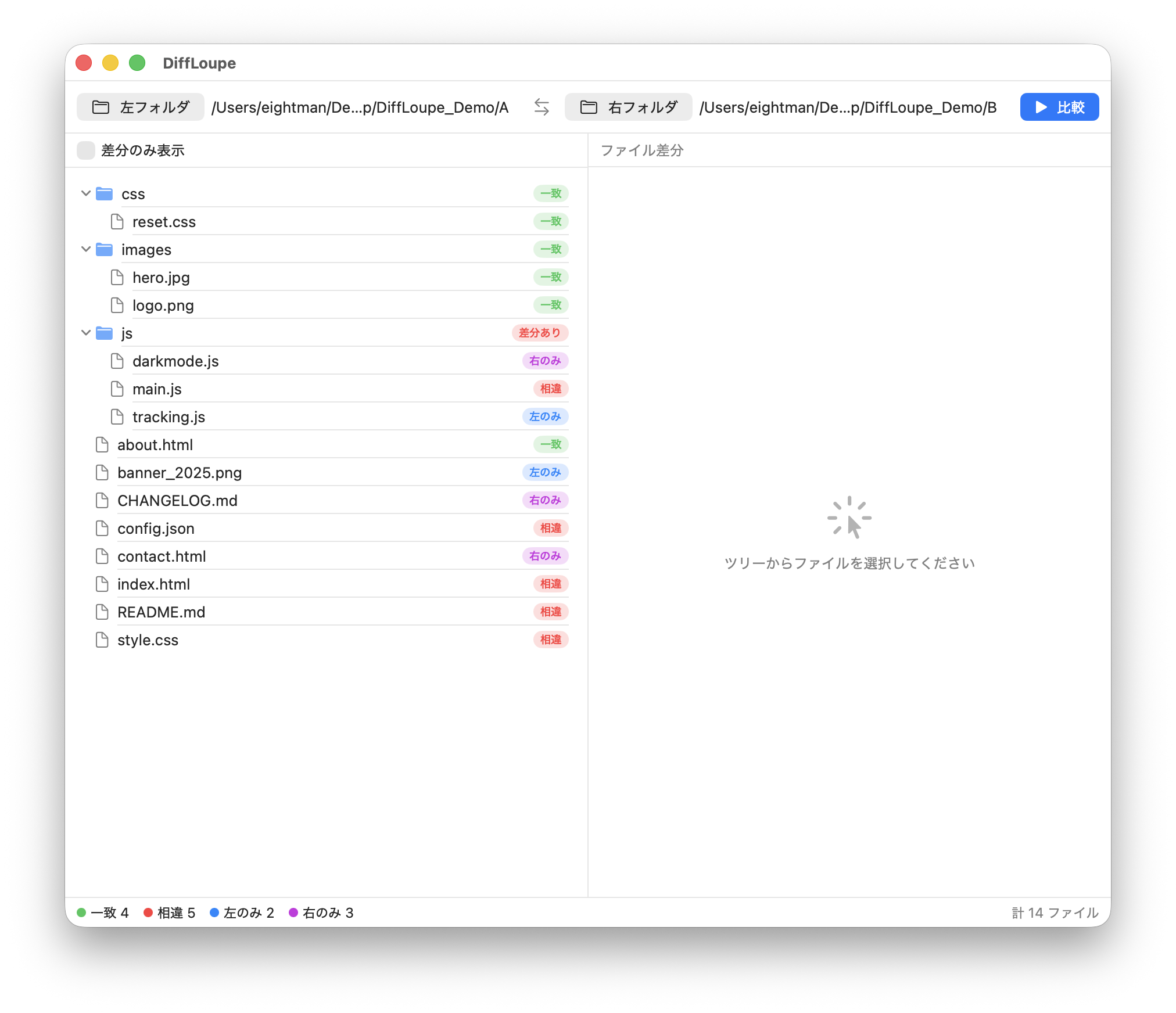
The tree on the left color-codes each item as Identical / Different / Left only / Right only. For differing text, you can review line-by-line differences on the right.
What is DiffLoupe
DiffLoupe is a native macOS app that lets you quickly answer "How do this folder and that folder differ?" in a two-pane, side-by-side view. It makes short work of everyday "just to be sure" checks — final reviews of folder deliverables, matching a backup against the original data, or checking the differences in a half-organized photo folder.
A lightweight, ready-to-run two-pane comparison that feels much like WinMerge on Windows. It is designed with no external library dependencies whatsoever, so you can download it, open it, and start using it right away.
Key features
- Two-pane folder comparison — Recursively compares the left and right folders and displays them in a tree, classified as Identical / Different / Left only / Right only.
- Smart and fast detection — First compares by size, then strictly verifies the contents of matching items with SHA-256. Stays responsive even at the scale of tens of thousands of files.
- Line-by-line diff view — Select a differing text file to see a side-by-side view with additions in green, deletions in red, and changes in yellow.
- Automatic noise exclusion — Excludes
.git/.DS_Store/node_modulesby default (can be turned off in settings). - Never freezes, always cancellable — The interface stays responsive during a comparison, and you can cancel at any time.
- Remembers its state — Remembers the window size and position.
How to use
- Launch the app and choose the two folders you want to compare under "Left folder" and "Right folder".
- Press the "Compare" button (⌘R) to start scanning. Progress is shown at the bottom of the window.
- Review the color-coded statuses in the result tree.
- Click a "Different" text file to see the line-by-line differences on the right.
System requirements
Because this app has not been notarized by Apple (Notarization), you may see a "developer cannot be verified" message the first time you open it. You can launch it by right-clicking the icon and choosing "Open", or by running
xattr -cr /Applications/DiffLoupe.app in the Terminal.
Not included in this version
v1 focuses on folder comparison and text diffs. A hex viewer / image comparison / 3-way merge / file editing / folder sync / git integration / character encodings other than UTF-8 are not included (files that differ only in line endings are classified as "Different").
Privacy & Safety
- No external communication — DiffLoupe performs no network communication at all. All comparison processing is completed entirely on your Mac (locally).
- No data sent — Folder contents, file names, and comparison results are never sent to an external server. There is no analytics, tracking, or advertising.
- No automatic updates — It never communicates on its own to check for updates. Updates are obtained manually from GitHub.
It works as-is even in an environment with no internet connection.
About distribution
DiffLoupe is an open-source app distributed only via GitHub Releases (it is not distributed on the App Store). The source code is published in the GitHub repository, where anyone can review its contents.
Because this is an individually developed, free app, it has not undergone Notarization through Apple's paid Developer Program.
As a result, a "developer cannot be verified" message appears on first launch, but you can launch it using the steps described above in "System requirements"
(right-click → "Open", or xattr -cr).
If you are concerned about whether the source is trustworthy, please verify the integrity of your download with the SHA-256 hashes below.
Verify your download (SHA-256)
You can verify whether the file you downloaded is identical to the distributed file (i.e., not corrupted or tampered with) using the SHA-256 hash. If it matches the values below, it is a genuine file.
b553946a607c5bd61447409812fadd427adf4869c49cd2af0c47d81a981ea79e
a8579ac59003996e7797b5af2860a89c9de5d08f74e5752d0036b43123632a64
How to check in the Terminal (example):
shasum -a 256 ~/Downloads/DiffLoupe-1.0.0.dmg